
Myo Armband
Block Catalogue / Devices
Tick-driven BLE source for the Thalmic Myo armband: dequeues one BLE EMG sample per tick and decodes 8 signed bytes through a 256-entry LUT.
Input and output
| Property | Value |
|---|---|
| Type | myo, mosaic.models.myo |
| Inputs | exactly 1 — a tick source, normally a ClockBlock; the sender is never inspected |
| Consumes | one tick per OnReceive; the payload is ignored. EMG bytes come from BleDevice.DequeueBuffer |
| Publishes | Vector<double> (MathNet DenseVector) of exactly 8 channels, (sbyte)b / 128.0 in [−1.0, +0.992] |
Parameters
| # | Name | Type | Default | Meaning |
|---|---|---|---|---|
| 0 | MyoName | string | null |
Case-insensitive substring filter applied to BLE scan results only; never validated |
The palette calls this DeviceName while the property is MyoName — cosmetic drift.
Requirements and use
Scan and connect the armband from its card, then start the upstream Clock. The clock pumps buffered EMG samples; Bluetooth connection alone does not run that pipeline.
- Open the Myo block's card in Blocks Overview and find BLE DEVICE.
- Use Scan, select the intended armband from the results, and press Connect.
- Check that the device reports a connection, then start the upstream Clock.
- Show the scope and check for changing EMG values before interpreting downstream results.
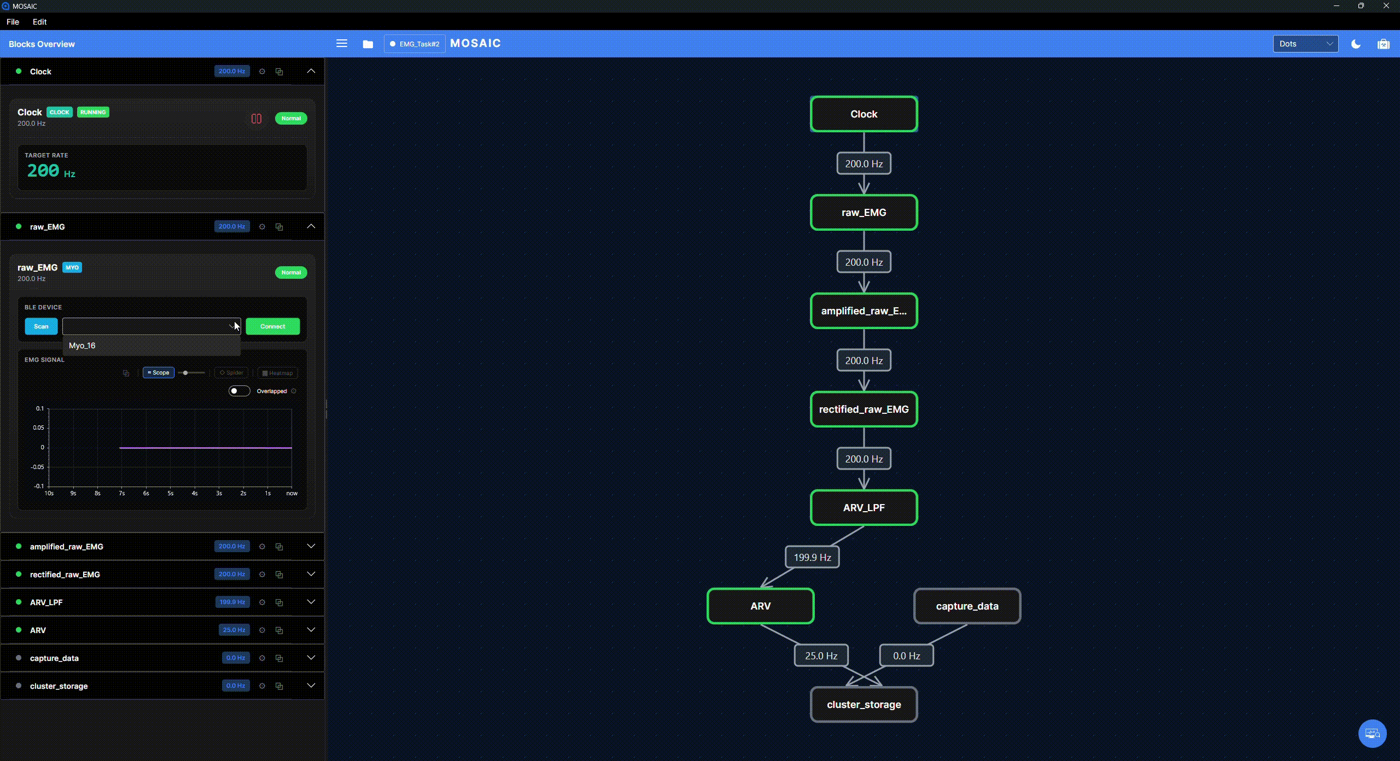
This desktop teaching screenshot locates the connection controls. The device is not connected yet; a rate label on the graph is not evidence of fresh sensor data. The device name shown is an example, not a name you need to enter.
For parameter positions and connection rules, see Pipeline Configuration. For capturing output, see Recording.
Implementation
API reference. Model defaults above describe configuration loading; palette hints may expose a subset or select different defaults.